

本文整理了 Magento 2 開發過程中最常見、以及較少人知道的錯誤,並提供解答。 每一次新版本推出,開發體驗都在進步。 但仍有許多錯誤訊息晦澀難懂、讓人摸不著頭緒。
無論您是資深開發者還是剛入門,這份指南都列出了現成的解決方法,幫您修正 Magento 2 的問題,讓專案順利運作。
這份指南會持續更新。
結帳擴充功能互相覆蓋是另一個主題:如何客製化 Magento 2 結帳流程說明了如何挑選與測試它們。
缺少 di.xml 設定參數
發生時機:
- bin/magento setup:upgrade
- bin/magento setup:di:compile
Notice: Undefined index: value in /var/www/html/vendor/magento/framework/Data/Argument/Interpreter/DataObject.php on line 37Undefined index: value 的解決方法
檢查模組的 di.xml 檔案中,是否缺少 item 設定。 以下是無效的 Magento 2 設定範例:
<type name="Magento\Framework\Console\CommandListInterface">
    <arguments>
        <argument name="commands" xsi:type="array">
            <item name="lucid-modules-kustom-command" xsi:type="object"></item>
        </argument>
    </arguments>
</type>
您可能已經注意到,XML 節點 lucid-modules-kustom-command 是空的。
請填入要作為 object 參數注入的類別完整名稱。
後台表格無法排序
如果後台表格無法正確排序,而且每一列都顯示相同的資料,很可能是您沒有在 <storageConfig> 節點中設定索引欄位:
排序正確但載入緩慢的表格是另一個問題,請參考 如何修正緩慢的 Magento 2 後台。
自訂後台表格在 Magento 2 無法正確排序的解決方法
打開模組中的表格元件 XML 定義檔,例如:
view/adminhtml/ui_component/{GRID_COMPONENT_NAME}_listing.xml將索引欄位設為資料表主鍵的欄位名稱:
<dataSource name="vendor_module_listing_data_source" component="Magento_Ui/js/grid/provider">
    <settings>
        <updateUrl path="mui/index/render" />
        <storageConfig>
            <param name="indexField" xsi:type="string">entity_id</param>
        </storageConfig>
    </settings>
    <!-- Other entries -->
</dataSource>
catalog_product 索引未重建
這個情況會在您刪除 ElasticSearch / OpenSearch 的所有索引,或啟動全新的執行個體時發生:
Exception #0 (LogicException): catalog_product index does not exist yet. Make sure everything is reindexed.catalog_product 索引不存在的解決方法
在出問題的機器上,用 CLI 指令執行重建索引:
bin/magento index:reindex
不支援的 ElasticSearch 或 OpenSearch 版本
用 bin/magento index:reindex 為全新安裝的 Magento 建立索引後,出現以下錯誤:
bin/magento index:reindex
...
Catalog Search index process unknown error:
{"error":"no handler found for uri [/magento2_product_1_v1/document/_mapping] and method [PUT]"}
Magento 2「no handler found for uri」錯誤的解決方法
Magento 2.4.5 及更早的版本不支援 ElasticSearch 8 與 OpenSearch 2。
請將 ElasticSearch 降到 7.* 版,或將 OpenSearch 換到 1.* 版。
Magento 2 重建索引時出現 cluster block exception
執行 Magento 升級或重建索引指令時,可能會出現 cluster_block_exception [TOO_MANY_REQUESTS] 錯誤。
ElasticSearch 或 OpenSearch 可能回傳類似以下的訊息:
{
  error: {
    root_cause: [
      {
        type: "cluster_block_exception",
        reason: "index [magento2_product_2_v1090] blocked by: [TOO_MANY_REQUESTS/12/index read-only / allow delete (api)];",
      },
    ],
    type: "cluster_block_exception",
    reason: "index [magento2_product_2_v1090] blocked by: [TOO_MANY_REQUESTS/12/index read-only / allow delete (api)];",
  },
  status: 429,
}
Magento 2 cluster block exception 的解決方法
釋放 ElasticSearch 執行個體的磁碟空間,或用 curl 請求停用配置門檻。
curl -XPUT -H "Content-Type: application/json" http://localhost:9200/_cluster/settings -d '{ "transient": { "cluster.routing.allocation.disk.threshold_enabled": false } }'curl -XPUT -H "Content-Type: application/json" http://localhost:9200/_all/_settings -d '{"index.blocks.read_only_allow_delete": null}'Magento 2 佈景主題沒有顯示
您在本機環境開發 Magento 2,但佈景主題沒有顯示。
原因可能是您在下載佈景主題檔案之前,就執行了 bin/magento setup:upgrade。
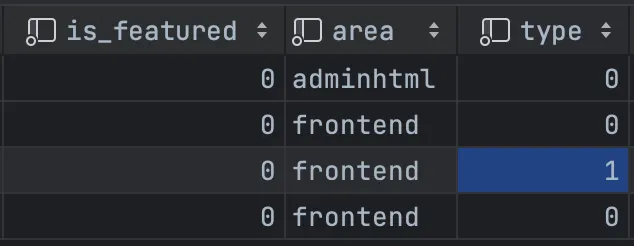
佈景主題不顯示的解決方法
在 Magento 2 的 theme 資料表中,將 type 欄位更新為 0。
匯入失敗並出現 Error in data structure: entity values are mixed
這個問題發生在 Magento 2 匯入流程失敗之後。
Magento 2 會把匯入的資料列保存在 importexport_importdata 資料表中,確保每一列都有唯一的 ID。
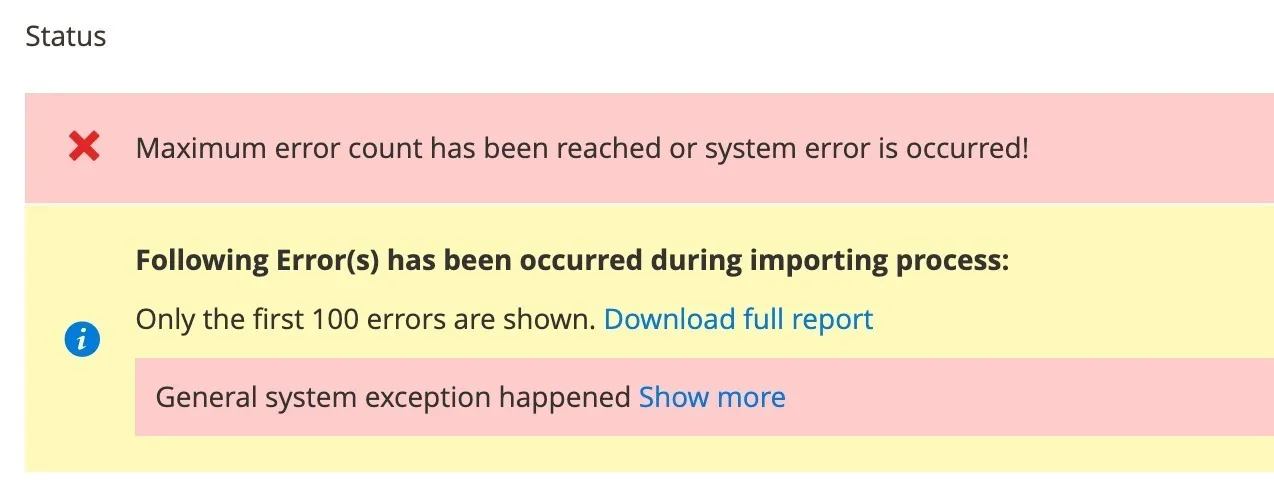
Magento 2 Error in data structure 的解決方法
用以下 SQL 指令清空 importexport_importdata 資料表,移除過時的匯入資料:
TRUNCATE importexport_importdata;如果您的資料表有前綴,請記得加上對應的前綴。
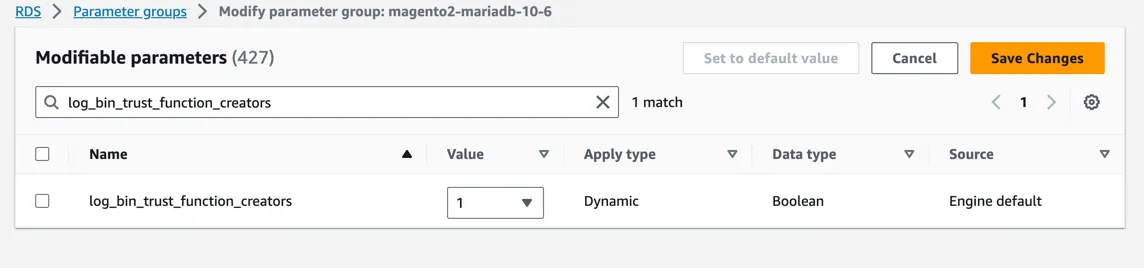
You do not have the SUPER privilege and binary logging is enabled
這個錯誤可能在執行 bin/magento setup:upgrade 時發生。
完整的錯誤訊息:
SQLSTATE[HY000]: General error: 1419 You do not have the SUPER privilege and binary logging is enabled (you *might* want to use the less safe log_bin_trust_function_creators variable), query was: DROP TRIGGER IF EXISTS `trg_catalog_category_entity_after_insert`刪除 trigger 失敗的解決方法
在資料庫參數中啟用 log_bin_trust_function_creators:
log_bin_trust_function_creators = 1
在 AWS RDS 主控台中看起來像這樣:
Magento cron.log 出現錯誤:No callbacks found for cron job example_cron_job_name
這個錯誤會在您解除安裝模組,或移除先前存在的 cron 任務設定時發生。
以下是 crontab.xml 的 Magento 2 設定範例:
<?xml version="1.0"?>
<config xmlns:xsi="http://www.w3.org/2001/XMLSchema-instance" xsi:noNamespaceSchemaLocation="urn:magento:module:Magento_Cron:etc/crontab.xsd">
    <group id="default">
        <job name="example_cron_job_name" instance="Vendor\Module\Cron\SampleCron" method="execute">
            <config_path>crontab/default/jobs/example_cron_job_name/schedule/cron_expr</config_path>
        </job>
    </group>
</config>
No callbacks found for cron job 的解決方法
找出已移除 cron 任務的設定:
SELECT config_id, path FROM core_config_data WHERE path LIKE '%example_cron_job_name%';再刪除上一個查詢取得的 ID:
DELETE FROM core_config_data WHERE config_id = `{id_from_the_select}`;sales_order_data_exporter view does not exist
當索引器指令、部署腳本或 cron 引用了 Payment Services 的資料匯出 feed,但宣告這些 feed 的模組不存在或已停用時,就會出現這個錯誤:
InvalidArgumentException: sales_order_data_exporter view does not exist.sales_order_data_exporter view does not exist 的解決方法
如果您使用 Adobe Payment Services,請啟用 Magento_SalesOrdersDataExporter 模組組合。若沒有使用,請從部署腳本,以及 mview_state / indexer_state 資料表中,移除殘留的相關引用。
完整的診斷與兩種修正方式,請參考專門的指南:
如何修正 Magento 2 的「sales_order_data_exporter view does not exist」。
Magento jQuery Ui 棄用警告
Fallback to JQueryUI Compat activated.
Your store is missing a dependency for a jQueryUI widget.
Identifying and addressing the dependency will drastically improve the performance of your site.
這個主控台警告的原因,是程式碼請求了 jquery/ui,而不是對應的 UI 模組:
define([
    'jquery/ui',
],
Magento 2 已將龐大的 jquery/ui 拆成獨立的模組,以提升效能並縮小 UI 元件的 JS 程式碼。不過為了維持向下相容,compat.js 檔案會在舊程式碼仍請求整個 jquery/ui 模組時,載入所有 Ui 模組。
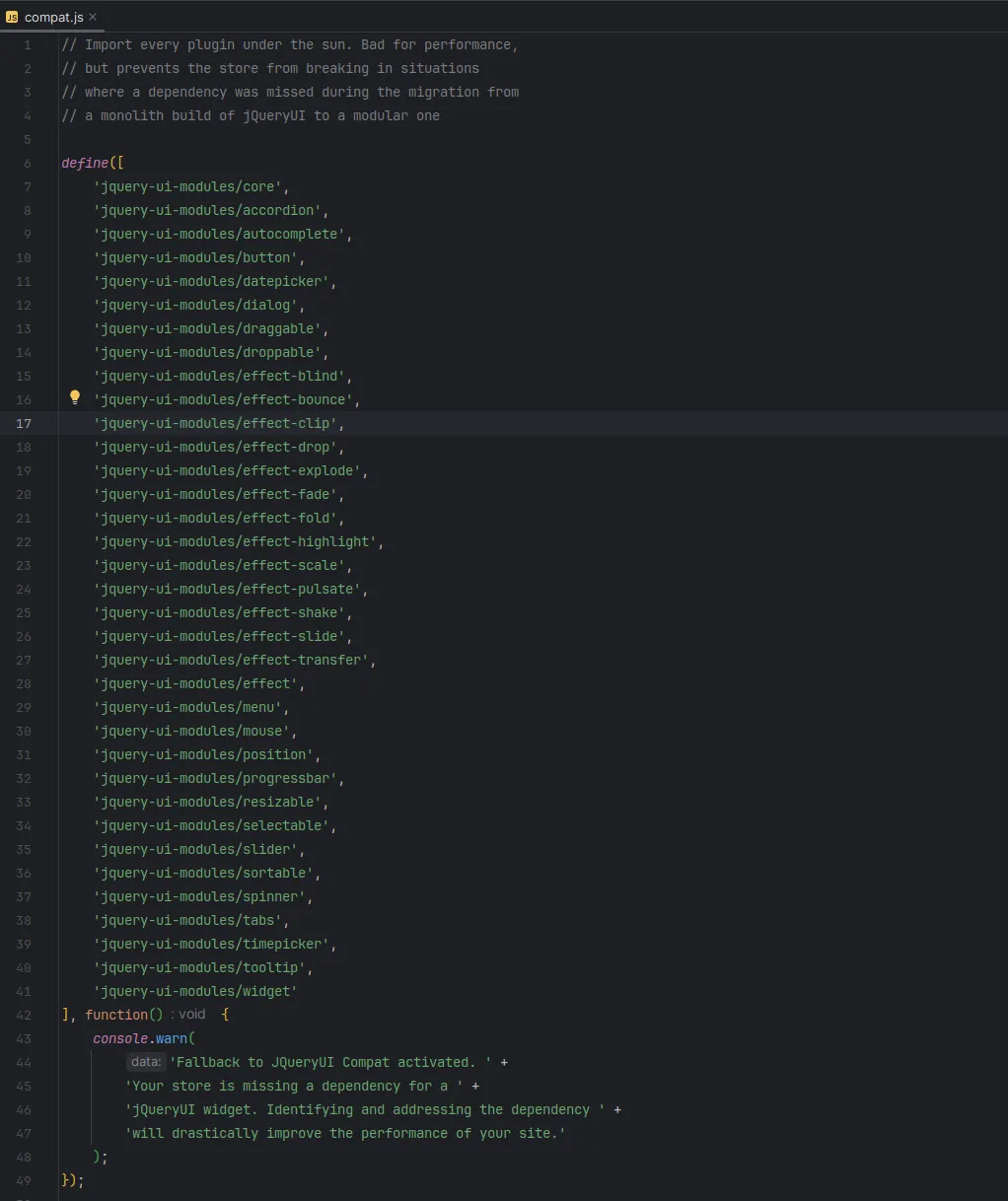
jquery/ui 相容性的解決方法
在程式碼與佈景主題中搜尋所有使用 jquery/ui 的地方,並改用對應的模組。您可以在 Magento 2 的 vendor/module-ui 目錄中,依函式名稱找到適合的模組,例如:jquery-ui-modules/widget。
想進一步提升前台速度,請參考 Magento 2 效能優化檢查清單。
常見問題
Magento 2 常見錯誤
Magento 2 出現 catalog_product index does not exist yet 該怎麼修正?
這個錯誤會在 ElasticSearch 或 OpenSearch 的所有索引被刪除後,或在全新的執行個體上出現。請在出問題的機器上執行 bin/magento index:reindex 重建索引。
Magento 2 重建索引時出現 no handler found for uri 錯誤,原因是什麼?
Magento 2.4.5 及更早的版本不支援 ElasticSearch 8 或 OpenSearch 2。請將 ElasticSearch 降到 7.* 版,或將 OpenSearch 換到 1.* 版,再重新執行重建索引。
Magento 2 出現 cluster_block_exception TOO_MANY_REQUESTS 該怎麼修正?
磁碟空間不足時,ElasticSearch 或 OpenSearch 會把索引設為唯讀。請釋放磁碟空間,或在叢集設定中停用磁碟配置門檻,再用 curl 請求將 index.blocks.read_only_allow_delete 重設為 null。
為什麼我的 Magento 2 佈景主題沒有顯示?
在佈景主題檔案下載之前就執行 bin/magento setup:upgrade,會讓佈景主題被註冊為虛擬佈景主題。請在 Magento 2 的 theme 資料表中,將該佈景主題的 type 欄位設為 0。
Magento 2 匯入時出現 Error in data structure: entity values are mixed 該怎麼修正?
匯入失敗會在 importexport_importdata 資料表中留下過時的資料列。請用 TRUNCATE importexport_importdata 清空該資料表(若資料庫有使用前綴,請加上前綴),再重新匯入。
Magento 2 出現 No callbacks found for cron job 該怎麼修正?
這個錯誤發生在模組或 cron 任務的設定被移除,但相關設定仍留在資料庫中的情況。請在 core_config_data 中找出 path 包含該 cron 任務名稱的資料列,並依 config_id 刪除。