
要以程式碼管理 Magento 2 上的 New Relic,請把工作分成兩半。伺服器端安裝 PHP agent 並啟用 Magento 的 New Relic 模組,由它為交易命名並送出部署標記。
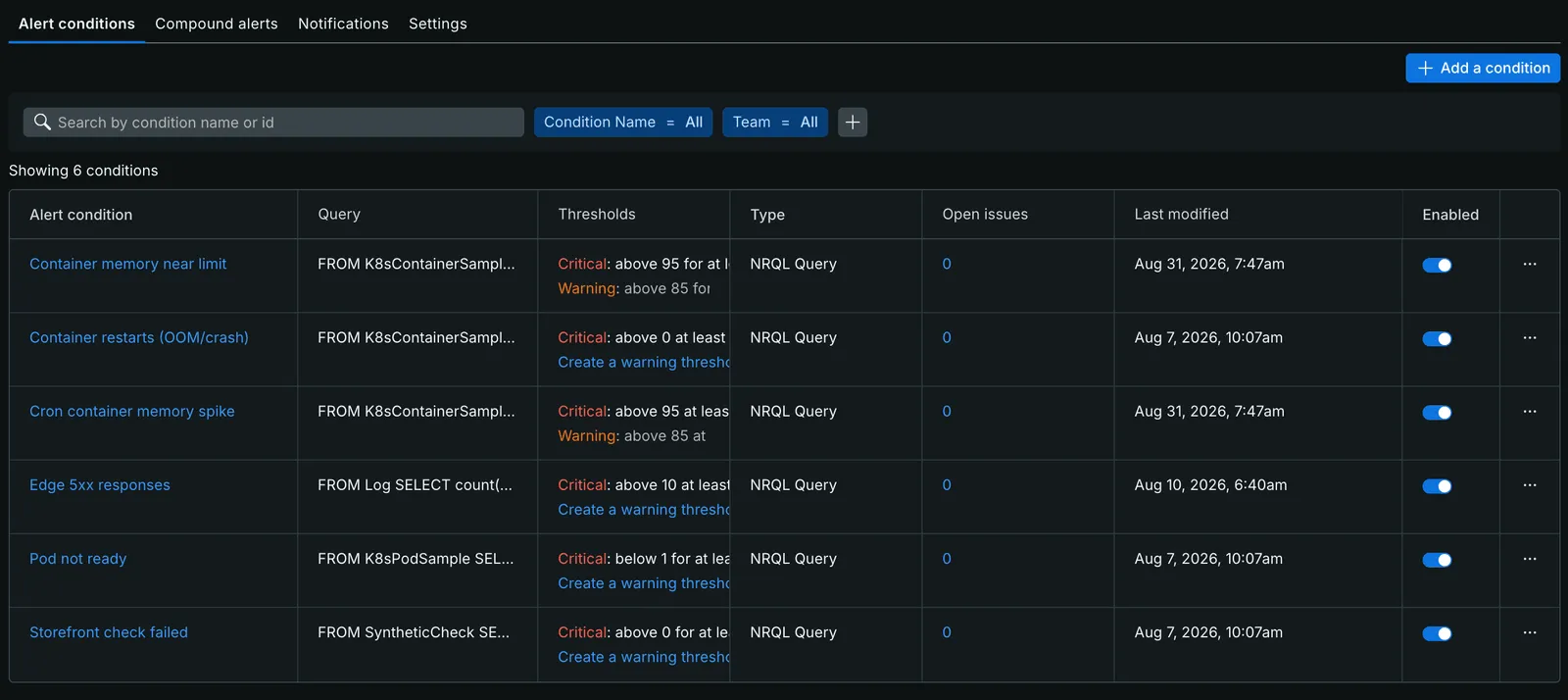
接著由 newrelic Terraform provider 管理 New Relic 帳號內的一切:告警政策、NRQL 條件、儀表板,以及發送通知的工作流程。
以下步驟逐一說明各個部分,並附上可依您帳號調整的 Terraform 範例。
本指南涵蓋安裝與告警。若要降低每月帳單,請參考 Magento 上的 New Relic 計價。
您需要準備
- 一個 Magento 2.4 商店,每台網頁伺服器與 cron 伺服器都已安裝 New Relic PHP agent。
- New Relic 帳號 ID 與 User API 金鑰。這類金鑰以
NRAK開頭。 - Terraform 1.5 以上版本,或 OpenTofu。
- 已啟用
Magento_NewRelicReporting模組。Magento Open Source 與 Adobe Commerce 都內建這個模組。
provider 不會動到伺服器。
agent 讀取 newrelic.ini,屬於您的伺服器工具,跟 PHP 本身放在一起。
步驟 1:安裝 PHP agent 並為應用程式命名
New Relic 以名稱區分應用程式。 請一次選定,因為新名稱會建立新的應用程式實體,歷史資料就此中斷(為 PHP 應用程式命名)。
; /etc/php/8.3/mods-available/newrelic.ini (the path depends on your distribution)
newrelic.license = "YOUR_INGEST_LICENSE_KEY"
newrelic.appname = "Acme Store"
; The agent detects Magento by itself. Set it only if detection fails.
newrelic.framework = "magento2"
同一台伺服器上有多個商店時,每個商店都需要自己的名稱。 PHP-FPM 可以依 pool 設定:
; /etc/php/8.3/fpm/pool.d/acme-eu.conf
[acme-eu]
php_value[newrelic.appname] = "Acme Store EU"
New Relic 文件也示範了在 NGINX 的 location 區塊中使用 fastcgi_param PHP_VALUE "newrelic.appname=..."。
文件同時提醒,這個值有時根本傳不到 PHP,所以獨立的 pool 是比較安全的選擇(目錄層級設定)。
步驟 2:設定 Magento 的 New Relic 模組
Magento 的 New Relic 整合位於 Magento_NewRelicReporting。
它在 agent 之上額外提供四項功能:
- 將 CLI 交易命名為
CLI <command name>,讓indexer:reindex與cron:run以獨立的交易顯示。 - 將 Magento HTTP 應用程式捕捉到的例外,以錯誤的形式送到 New Relic。
- 為交易加上自訂屬性:下單請求上的
Order、orderValue與lineItemCount,以及前台請求上的store與website。 - 可以把每個 Magento 區域(area)回報為獨立的應用程式。
所有設定都位於 newrelicreporting/ 下(出自模組的 system.xml):
newrelicreporting/general/enable:開啟整合。newrelicreporting/general/app_name:應用程式名稱,與newrelic.appname相同。newrelicreporting/general/app_id:v2 REST 部署 API 使用的 APM 應用程式 ID。newrelicreporting/general/api:部署標記使用的 API 金鑰,以加密方式儲存。newrelicreporting/general/account_id:帳號 ID。newrelicreporting/general/insights_insert_key:cron 事件使用的 insert key。newrelicreporting/general/separate_apps:將每個 area code 回報為額外的應用程式。newrelicreporting/general/api_mode:v2_rest或nerdgraph(Magento 2.4.9 以上)。newrelicreporting/general/entity_guid:NerdGraph 模式使用的實體 GUID(Magento 2.4.9 以上)。newrelicreporting/cron/enable_cron:開啟模組的 cron 回報。
模組將帳號 ID、應用程式 ID 與兩把金鑰標記為敏感資料。
請用 config:sensitive:set 設定,讓它們寫入 app/etc/env.php,不會出現在資料庫備份中:
bin/magento config:set newrelicreporting/general/enable 1
bin/magento config:set newrelicreporting/general/app_name "Acme Store"
bin/magento config:sensitive:set newrelicreporting/general/account_id 1234567
bin/magento config:sensitive:set newrelicreporting/general/app_id 987654321
bin/magento config:sensitive:set newrelicreporting/general/api "NRAK-..."
同一個指令會執行該欄位的 backend model,所以 API 金鑰在 env.php 中仍是加密的。
單一應用程式,或每個區域一個應用程式
將 separate_apps 設為 1 時,模組會以兩個名稱呼叫 newrelic_set_appname():前台是 Acme Store;Acme Store_frontend,後台是 Acme Store;Acme Store_adminhtml。
第一個名稱保留所有請求,第二個名稱讓每個區域各有一個應用程式。
這樣 Acme Store_frontend 上的告警就不會被緩慢的後台列表與冗長的 cron 工作干擾。
監控資料中的顧客姓名
對已登入顧客的前台請求,模組還會加上 CustomerId 與 CustomerName。
監控工具裡的顧客姓名屬於個人資料,您必須說得出保留的理由。
如果用不到,請在 agent 中排除:
newrelic.attributes.exclude = "CustomerName"步驟 3:每次發布都送出 New Relic 部署標記
部署標記會在版本上線的時間點,於每張 APM 圖表上畫一條線。 「結帳在星期二變慢了」就變成「結帳在第 412 版發布後變慢了」。 Magento 內建了對應的指令:
bin/magento newrelic:create:deploy-marker "Release 412" "Fix tax rounding, PHP 8.3" "deploy-bot" "412"參數依序是訊息、變更紀錄、使用者與版本號。
請一定要帶入變更紀錄,因為目前的 Magento 程式碼將它列為必填,即使舊文件說它是選填。
在 Magento 2.4.9 上,若 api_mode 設為 nerdgraph,指令還接受 --commit、--deep-link 與 --group-id。
此時它會呼叫 NerdGraph 的 changeTrackingCreateDeployment mutation,而不是舊的 REST 端點。
請把它放在部署的最後一步,在 setup:upgrade 與清除快取之後執行。
在 Capistrano 流程中,它就是 deploy:published 之後多一個任務(請參考用 Capistrano 自動部署)。
開啟 enable_cron 後,模組的 cron 工作也會在有人啟用、停用、安裝或移除模組時建立標記。
步驟 4:用 New Relic Terraform provider 建立告警政策
以帳號與區域設定 provider。
金鑰放在 NEW_RELIC_API_KEY 環境變數中,provider 預設會讀取它(provider 設定):
terraform {
  required_providers {
    newrelic = {
      source  = "newrelic/newrelic"
      version = "~> 3.68"
    }
  }
}

provider "newrelic" {
  account_id = var.account_id
  region     = var.region # US, EU or JP
}
每個商店一個政策,路由就很單純。
PER_CONDITION 會為每個條件各開一個 issue,所以結帳變慢與錯誤暴增會以兩則通知送達:
resource "newrelic_alert_policy" "magento" {
  name                = "Magento: ${var.app_name}"
  incident_preference = "PER_CONDITION"
}
每個訊號都是一個 newrelic_nrql_alert_condition。
四段 NRQL 查詢涵蓋了 Magento 商家最先感受到的故障:
-- Apdex for web transactions
SELECT apdex(duration, t: 0.5) FROM Transaction
WHERE appName = 'Acme Store' AND transactionType = 'Web'

-- Web error rate (%)
SELECT percentage(count(*), WHERE error IS TRUE) FROM Transaction
WHERE appName = 'Acme Store' AND transactionType = 'Web'

-- Place order p95 (s)
SELECT percentile(duration, 95) FROM Transaction
WHERE appName = 'Acme Store' AND request.uri LIKE '%/payment-information'

-- Orders placed
SELECT count(*) FROM Transaction
WHERE appName = 'Acme Store' AND `Order` = 1
下單篩選條件對應 Magento 的結帳端點 /V1/carts/mine/payment-information 與 /V1/guest-carts/:cartId/payment-information。
Order 需要加上反引號,因為 ORDER 是 NRQL 的保留字。
NRQL 中的 Apdex 只計算耗時,錯誤不會拉低分數(NRQL apdex())。
這就是錯誤率需要獨立條件的原因。
以下是 Apdex 條件:
resource "newrelic_nrql_alert_condition" "apdex" {
  policy_id                    = newrelic_alert_policy.magento.id
  type                         = "static"
  name                         = "Apdex below target"
  violation_time_limit_seconds = 86400
  aggregation_window           = 60
  aggregation_method           = "event_flow"
  aggregation_delay            = 120

  nrql {
    query = "SELECT apdex(duration, t: ${var.apdex_t}) FROM Transaction WHERE appName = '${var.app_name}' AND transactionType = 'Web'"
  }

  critical {
    operator              = "below"
    threshold             = 0.7
    threshold_duration    = 300
    threshold_occurrences = "all"
  }
}
訂單最適合用 baseline 條件,搭配 baseline_direction = "lower_only" 與每週季節性。
固定門檻不是每晚都觸發,就是漏掉星期六的停機。
基準線會學習每週的節奏,在訂單明顯低於它時觸發。
這能抓到沒有拋出錯誤、卻已經失敗的付款方式。
相較於頁面瀏覽,下單請求很少。
請給這個條件 5 分鐘的時間窗,並使用 aggregation_method = "event_timer",這是 New Relic 建議用於稀疏資料的方法。
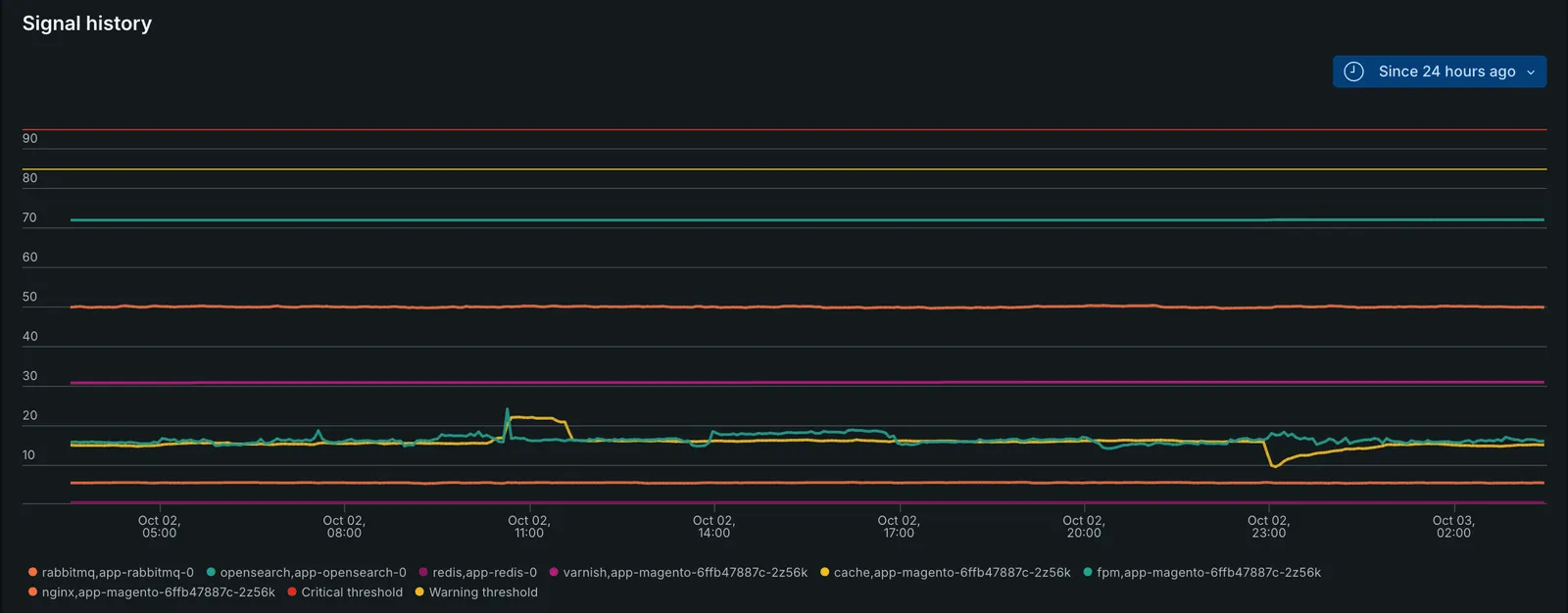
信任一個新條件之前,請先檢查它的訊號歷史。 上圖將每個容器的記憶體用量與警告、嚴重門檻畫在一起,讓您看出門檻留了多少餘裕。
步驟 5:用工作流程路由通知
通知需要三種資源。
目的地(destination)存放目標(電子郵件地址、webhook、PagerDuty)。
頻道(channel)是訊息範本,必須設定 product = "IINT" 才能搭配工作流程使用。
工作流程(workflow)依政策挑選 issue,並送到頻道:
resource "newrelic_workflow" "magento" {
  name                  = "Magento: ${var.app_name}"
  muting_rules_handling = "DONT_NOTIFY_FULLY_MUTED_ISSUES"

  issues_filter {
    name = "Magento policy"
    type = "FILTER"

    predicate {
      attribute = "labels.policyIds"
      operator  = "EXACTLY_MATCHES"
      values    = [newrelic_alert_policy.magento.id]
    }
  }

  destination {
    channel_id            = newrelic_notification_channel.email.id
    notification_triggers = ["ACTIVATED", "CLOSED"]
  }
}
Slack 目的地是例外。
provider 可以匯入、更新與刪除它們,但無法建立(newrelic_notification_destination)。
請先在 New Relic 介面中連接一次 Slack,再把目的地匯入 Terraform。
步驟 6:以程式碼管理 NRQL 儀表板
newrelic_one_dashboard 用同樣的 NRQL 描述頁面與小工具。
請依列、再依欄的順序列出小工具。
provider 文件提醒,其他順序會讓每次 plan 都出現差異。
resource "newrelic_one_dashboard" "magento" {
  name        = "Magento: ${var.app_name}"
  permissions = "public_read_only"

  page {
    name = "Magento: ${var.app_name}"

    widget_billboard {
      title  = "Apdex"
      row    = 1
      column = 1
      width  = 4
      height = 3

      nrql_query {
        query = "SELECT apdex(duration, t: 0.5) FROM Transaction WHERE appName = '${var.app_name}' AND transactionType = 'Web'"
      }
    }

    widget_line {
      title  = "Place order p95 (s)"
      row    = 4
      column = 1
      width  = 6
      height = 3

      nrql_query {
        query = "SELECT percentile(duration, 95) FROM Transaction WHERE appName = '${var.app_name}' AND request.uri LIKE '%/payment-information' TIMESERIES"
      }
    }
  }
}
用同樣的方式加入其他小工具:錯誤與訂單的看板、依總耗時排序的最慢交易表格,以及依來源顯示資料攝取量的圖表。 攝取量圖表是 Magento 上的 New Relic 計價一文中降低成本工作的起點。
套用之前
請把上面的範例當作起點,依您的商店調整。
依您自己的商店設定名稱與門檻,把資源放進同一份 Terraform 設定,並在第一次 apply 之前先對您的帳號執行 terraform plan。
範例會讀取四個變數,請在資源旁宣告:
variable "account_id" {
  type = number
}

variable "app_name" {
  type = string
}

variable "apdex_t" {
  type    = number
  default = 0.5
}

variable "region" {
  type    = string
  default = "US" # US, EU or JP
}
export NEW_RELIC_API_KEY="NRAK-..."
terraform init
terraform plan -var account_id=1234567 -var app_name="Acme Store"讓儀表板收集一週的資料,再依商店的實際表現調整門檻。
我們最常看到的錯誤
- 在
newrelic.ini中改應用程式名稱。 新名稱會建立一個歷史資料是空的新實體。請改為在介面中修改顯示別名。 - 在舊程式碼中保留
newrelic_nrql_drop_rule。 它已於 2026 年 8 月 31 日停止支援,API 呼叫現在會失敗(遷移指南)。請改用newrelic_pipeline_cloud_rule。 - 用平均值設定告警。 一次緩慢的結帳,會被上千次快取頁面瀏覽的平均值掩蓋。請使用百分位數,並篩選真正重要的請求。
- 從筆電送出部署標記。 請把指令放進部署腳本,否則星期五晚上沒有人會記得執行。
監控告訴您哪裡壞了,但修好它仍然需要有人動手。 這是我們 Magento 支援與維護服務的工作,導入流程就包含設定這個模組。 如果告警指向一家緩慢的商店,Magento 效能稽核能找出原因。 需要自訂交易或屬性的客製模組,請參考我們的 Magento 2 開發服務。
常見問題
New Relic、Terraform 與 Magento 2
Terraform 能設定 Magento 伺服器上的 New Relic PHP agent 嗎?
不能。newrelic Terraform provider 管理的是您 New Relic 帳號內的物件:告警政策、NRQL 條件、儀表板、通知目的地與工作流程。PHP agent 在伺服器上執行並讀取 newrelic.ini,所以請用您的伺服器工具(Dockerfile、Ansible 或部署腳本)安裝與設定它。
哪些 Magento 設定路徑控制 New Relic?
Magento_NewRelicReporting 模組的設定存放在 newrelicreporting/general 下。主要路徑有 enable、app_name、app_id、api、account_id、insights_insert_key 與 separate_apps。Magento 2.4.9 新增了 api_mode 與 entity_guid,用於 NerdGraph 部署標記。cron 回報位於 newrelicreporting/cron/enable_cron。
如何在 Magento 部署時建立 New Relic 部署標記?
新版本上線後,執行 bin/magento newrelic:create:deploy-marker,並帶入訊息與變更紀錄。第三與第四個參數是使用者與版本號。這個指令需要啟用 New Relic 整合,並在模組設定中填入 API 金鑰。
newrelic Terraform provider 還支援丟棄規則嗎?
不支援。newrelic_nrql_drop_rule 資源已於 2026 年 8 月 31 日停止支援,它的 API 呼叫現在會失敗。丟棄資料或屬性請改用 newrelic_pipeline_cloud_rule,指標彙總上的屬性則用 newrelic_metric_pruning_rule。
Magento 商店應該針對哪些項目設定告警?
從四個訊號開始:網頁交易的 Apdex、以錯誤結束的網頁交易比例、下單請求的第 95 百分位耗時,以及下單數相對於每週基準。最後一項能抓到不拋出錯誤、卻已經壞掉的付款方式。