
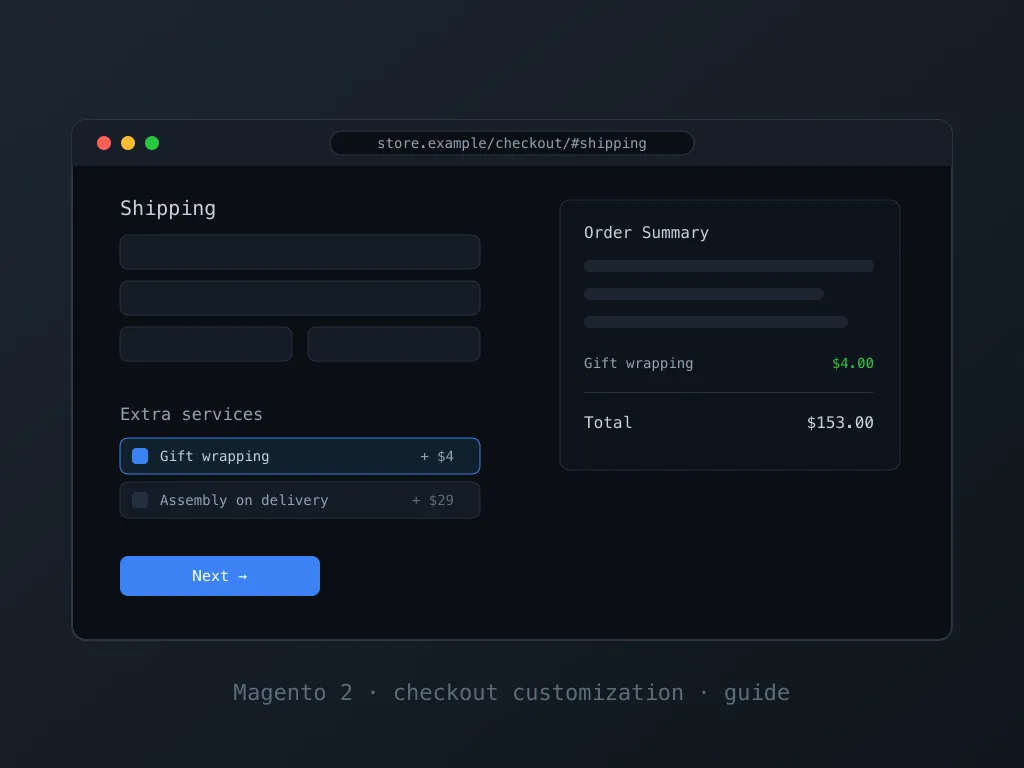
There are four levels of Magento 2 checkout customization, and choosing the right one matters more than any individual technique: built-in configuration, small declarative tweaks, focused extensions for common features, and a fully custom checkout. The checkout is the most conversion-critical and the most upgrade-fragile part of the store, so pick the smallest level that solves the problem. This guide walks through all four, with an honest look at what each costs and risks. Most stores build a personalized checkout from levels 1 to 3: the fields, services and delivery options their customers expect.
Level 1: Built-in Settings Most Stores Never Touch
Before any code, the admin configuration covers more than most merchants expect:
- Guest checkout on or off:
Stores → Configuration → Sales → Checkout → Checkout Options. Forcing account creation is one of the most reliable conversion killers, so keep guest checkout enabled unless a business rule forbids it. - Address form length: the number of street address lines and whether fields like company or fax (still there) appear, under
Customers → Customer Configuration → Name and Address Options. - Terms and conditions: enable the agreement checkbox under Checkout Options and manage the text under
Stores → Terms and Conditions. - Payment and shipping method visibility per country, so customers never see methods they cannot use.
- Quote lifetime and mini-cart behavior, which shape how customers return to an abandoned cart.
Review this level completely before spending on anything else, because it is free and upgrade-proof.
Level 2: Small Declarative Tweaks
Field-level changes belong in a small custom module rather than an extension suite:
- Remove or reorder fields with a plugin on the checkout
LayoutProcessor. Dropping an unused field (company, region where irrelevant) measurably shortens the form. - Relabel and set defaults through the same processor, for example preselecting the home country.
- JavaScript mixins adjust the behavior of a single component without replacing it.
Keep each tweak isolated and documented. The Luma checkout is a mesh of Knockout.js UI components declared in layout XML, and surgical changes survive upgrades far better than wholesale template overrides.
Level 3: Extensions for Common Features
Well-chosen extensions cover the features merchants ask for most. The selection rule: prefer focused modules that add one self-contained thing over mega-suites that rewrite the entire checkout, because two extensions fighting over the same UI component is the classic source of checkout bugs.
- Extra services and order-level upsells. Gift wrapping, assembly, unpacking, or same-day delivery offered on the shipping step, each as a priced line item that shows up cleanly in reporting. Our ready-made Magento checkout extension does this. Merchants use it to lift average cart value with services customers forgot to pick earlier.
- One-step checkouts compress the flow into a single page. Test before adopting, because fewer steps also means one dense form and heavier initial load, and results differ by catalog and audience.
- Delivery date and time pickers for stores where scheduling matters (furniture, groceries, B2B).
- Address autocomplete and validation against Google or a postal service, which cuts failed deliveries and typing effort on mobile.
Every added extension goes through staging with the full checkout exercised: guest and logged-in, each payment method, each shipping method.
Level 4: Full Custom or Headless Checkout
When checkout UX is a genuine differentiator and volume justifies it, teams replace the frontend entirely: a Hyvä-based checkout, a React checkout talking to Magento’s GraphQL API, or a fully headless storefront. The payoff is complete design freedom and typically much better Core Web Vitals. The price is a project measured in weeks plus ongoing ownership of everything Magento used to provide for free (payment method renderers, address handling, totals logic). Most stores get further, faster, by exhausting levels 1 through 3 first.
Why Checkouts Break, and How to Not Let Yours
Three patterns cause nearly all checkout regressions:
- Extension conflicts on the same step or component, as described above.
- Upgrades that change UI component internals an override depended on. Keep customizations declarative and small, and re-test the checkout after every Magento upgrade. Our Magento 2.4.6 upgrade guide covers the process.
- Silent JavaScript errors that leave a button dead only for some browsers or payment methods. An automated end-to-end test that places a real test order catches these before customers do.
Checkout speed deserves the same attention. Checkout pages are dynamic and skip the full-page cache, so they expose raw backend and JavaScript performance just like the admin does. The server-side half of that story is covered in our Magento 2 performance optimization checklist.
Where to Start
Audit level 1 settings today, plan level 2 field cleanup this sprint, and add level 3 features one focused extension at a time, measuring conversion after each change. If you want the checkout reviewed or a feature built without the trial and error, our Magento 2 development agency does this weekly.
Frequently asked questions
Magento 2 checkout customization
Can I customize the Magento 2 checkout without an extension?
Yes, up to a point. Native settings cover guest checkout, address field counts, terms and conditions, and payment or shipping method visibility. A small custom module with a layout processor plugin can remove, reorder, or relabel checkout fields. Extensions or custom builds become necessary for new functionality such as extra services, delivery scheduling, or a redesigned flow.
Is a one-step checkout better than the default Magento 2 checkout?
Sometimes, and it should be tested rather than assumed. Fewer steps reduce clicks but load more components at once and can overwhelm customers with one dense form. Stores with simple shipping needs often benefit, while stores with complex delivery options may convert better on the default two-step flow. A/B test before committing.
Why do checkout extensions conflict with each other?
The Luma checkout is built from Knockout.js UI components wired together by layout XML and JavaScript mixins. Two extensions modifying the same component or step frequently override each other's changes. Prefer focused extensions that add a self-contained block over suites that rewrite the whole checkout, and always test combinations on staging.
How do I offer services like gift wrapping or assembly at checkout?
Use an extension that adds priced service line items to the shipping or payment step. Each selected service is added to the order as its own line item, so revenue reporting stays clean. This approach suits services that apply to the whole order, while per-product options are better handled with product customizable options.
How much does a custom Magento 2 checkout cost?
Configuration and small field tweaks fit in hours. A focused extension with setup usually lands in the hundreds of dollars plus a day of integration testing. A fully custom or headless checkout is a project measured in weeks, and it makes sense when checkout UX is a core differentiator and the store's volume justifies it.