
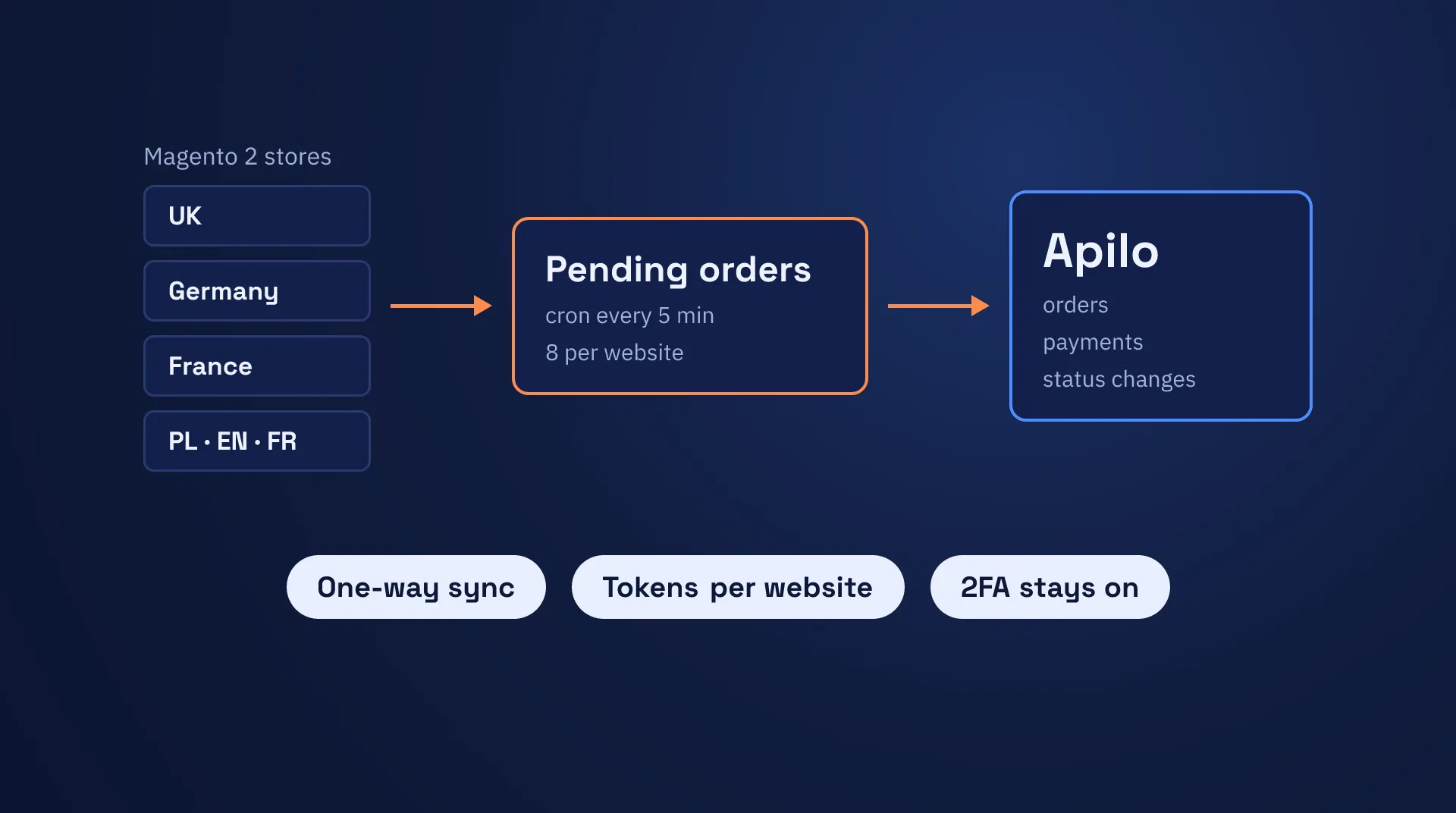
We built a Magento 2 Apilo integration for a furniture retailer with several regional websites. It pushes new orders, payments and status changes from each website to Apilo. Checkout never waits for Apilo. When an order fails to sync, the connector retries it. A daily email tells the team about any order that still needs a person.
The client
The client sells furniture online through regional Magento 2 storefronts. Each regional Magento install runs several country websites. In early 2025 the team moved its order handling from Baselinker to Apilo, an order management platform. Our Baselinker to Apilo migration case study explains why.
The same client’s media runs on S3 and CloudFront, as our Magento 2 CDN case study shows.
Why we built our own connector
In April 2025 we tested Apilo’s built-in Magento integration. It fell short for this store in two ways.
- No filter by website. The integration pulled every order from the whole Magento install, with no way to limit it to one website. Baselinker had a website field for this. The client runs several country websites on one Magento.
- A password login. The integration logged in to Magento with an admin username and password. Magento’s two-factor authentication (2FA) blocks that kind of login. Baselinker accepted an access token in place of the password. The client keeps 2FA on.
We asked Apilo support about both. They told us Apilo had no plans for either feature and passed both on as suggestions.
We first tried a workaround: a Magento admin user exempt from 2FA. It logged in, but the connection still failed. The cause was on our side. A Cloudflare rule on the store blocked the token URL, and we fixed it in May 2025.
The login worked after that fix. The built-in integration still pulled orders from every website, though. So we built a connector that pushes from Magento instead. Work started in early June 2025, and the UK store moved to it the same month. A week after the start we removed the 2FA-exempt admin user.
What the connector syncs
The sync runs one way, from Magento to Apilo. The connector never reads data back from Apilo.
- New orders. The customer, the addresses, the items and the payment and shipping methods. Shipping goes across as a line item.
- Order notes. Discounts and custom options travel as notes on the Apilo order.
- Payments. The connector reads them from the Magento invoice.
- Status changes. A status map for each store turns a Magento status into its Apilo match.
A payment method map covers cash on delivery, bank transfer, Amazon, Klarna, Stripe, PayPal and free orders.
Stock, prices, products, shipments, tracking and invoice documents stay outside the connector.
How the connector works
Checkout never waits for Apilo
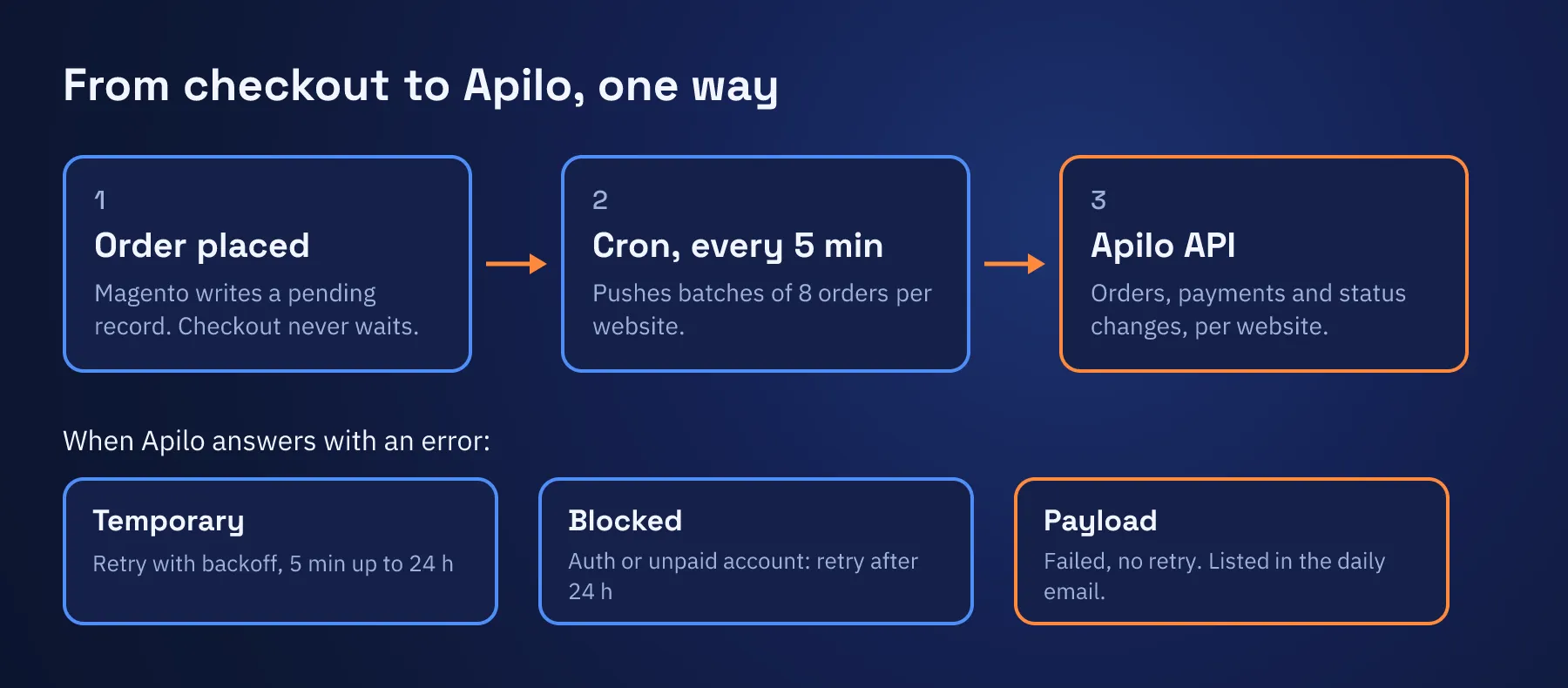
Placing an order only writes a pending record for the connector. Cron jobs push the pending records every 5 minutes, in batches of 8 orders per website. The jobs for different websites start at staggered times.
We tried Magento message queues first and dropped them for cron in the first week.
The batch size also works as the throttle. The connector has no separate rate limiter.
Tokens for each website
Each website stores its own Apilo API tokens. An access token lasts 21 days, and a refresh token lasts 2 months. The connector refreshes them before they expire. A CLI command refreshes them by hand when the team needs it.
One Magento order, one Apilo order
A unique key on the Magento order ID keeps the connector from sending the same order twice.
Retries with three error classes
Retries use exponential backoff. The first retry comes after 5 minutes, and no delay goes past 24 hours. Each delay varies by up to 20% either way.
The connector sorts every error into one of three classes.
- Temporary. The order retries with backoff. A response that is not JSON counts as temporary.
- Blocked. A failed login or an unpaid Apilo account retries after 24 hours.
- Payload. Apilo rejected the order data. The order fails and does not retry.
Checks before sending
Apilo sets shorter limits on address fields than Magento allows. A street name can hold 128 characters and a zip code 10. The connector checks every address field against these limits before it sends an order. An address over a limit fails as a payload error, and the message names the field, its length and the limit. The order then shows up in the daily email, and the saved error tells the team which field to shorten. A product with a blank name goes across under its SKU.
A sync grid and a daily email
A grid in the Magento admin shows the sync state of each order. A daily email for each website lists the orders that failed or are still retrying. The team marks each one resolved in the admin after fixing it.
Incidents that shaped it
- June 2025. The sync stalled when more than 5 orders waited.
- December 2025. Two orders never reached Apilo after a failed card payment, and their retries had stopped. This led to a rework of the retries and to the daily email.
- February 2026. Old orders kept retrying and filled the logs. Payload errors stopped retrying after that. In the same month an empty token made orders go missing, so the connector now checks the token before it sends.
- May 2026. Apilo rejected orders whose long German addresses went past its field limits. The team had shortened those addresses by hand to get the orders through. Since then the connector checks each field before it sends, and the error names the field to shorten.
- May 2026. A status with no Apilo match went across as
null, and Apilo answered with HTTP 422. The connector had also marked responses that were not JSON as permanent failures. They now count as temporary. - August 2026. A status with no Apilo match now skips the update.
Where it runs
- UK store: live since June 2025.
- A store with Polish, English and French websites: live since July 2025.
- Germany and France: live since February 2026.
The result
- Each website sends its own orders. Apilo gets every website’s orders with that website’s tokens.
- 2FA stays on. Apilo never logs in to the Magento admin.
- Checkout does not wait. A cron job sends new orders to Apilo every 5 minutes.
- Failed orders reach a person. The daily email lists every order that still needs attention.
Connect your store to Apilo
We connect Magento 2 to order, ERP and CRM systems through their APIs. See our integration services, or tell us about your store.
Frequently asked questions
Magento 2 Apilo integration
Does Apilo have a Magento 2 integration?
Yes, Apilo has a built-in Magento integration. When we tested it in April 2025, it pulled every order from the whole Magento install and logged in with an admin username and password. That did not fit a store with several websites and 2FA turned on. We built a connector that pushes orders from Magento to the Apilo API instead.
Can I send only one Magento website's orders to Apilo?
Yes, with a connector that pushes from Magento. Ours keeps Apilo tokens for each website and sends each website's orders with its own tokens. In our April 2025 test, the built-in integration had no per-website filter.
Does a Magento to Apilo connector work with Magento 2FA?
Yes, when Magento pushes the orders. Our connector signs in to the Apilo API with an Apilo access token. Apilo never logs in to the Magento admin, so 2FA stays on.
What does this Magento 2 Apilo integration sync?
New orders, payments and status changes, in one direction from Magento to Apilo. Discounts and custom options travel as order notes. Stock, prices, products, shipments, tracking and invoice documents stay out of it.
Why does Apilo reject an order with a long address?
Apilo limits the length of each address field. A street name can hold 128 characters and a zip code 10. A long German street address can go past that, and Apilo rejects the order. Our connector checks every field before it sends the order and names the field to shorten.
What happens when Apilo rejects an order?
The connector sorts each error into one of three classes. A temporary error retries with a growing delay that starts at 5 minutes and stops growing at 24 hours. An auth error or an unpaid account retries after 24 hours. A rejected payload fails at once and shows up in a daily email to the store team.